WHAT RUNS LOCALLY
Stop deploying to see a change.
Power Platform development usually means edit, upload, wait, clear the cache and refresh, in a shared
environment that has to be online and available. Paqvilo reads the sources you already export with the Power
Platform CLI and runs a local working model of them, so most of that loop happens on localhost.
-
Power Pages sites
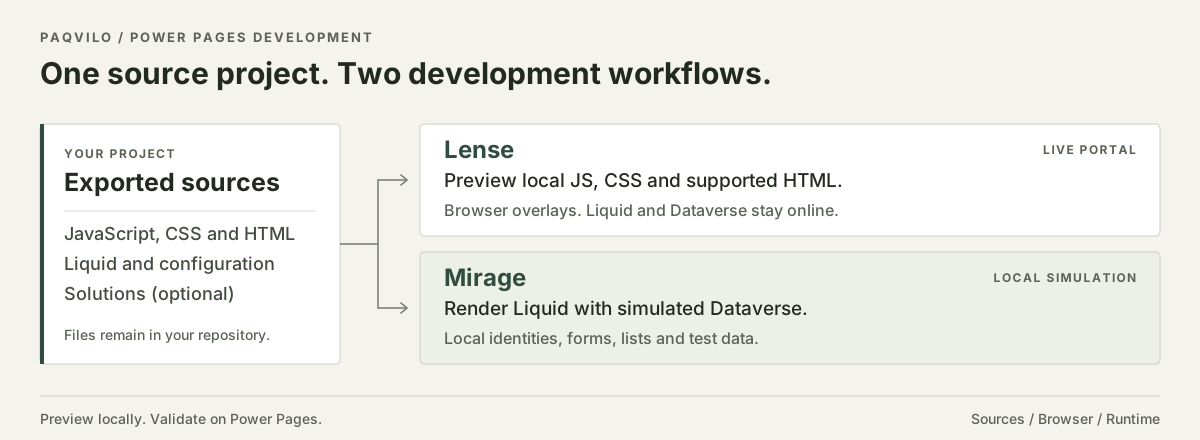
Render an exported site on localhost: Liquid templates and snippets, basic and multistep forms, lists,
languages, web roles and table permissions, with local sign-in as test personas.
Local Power Pages runtime ↗
-
Dataverse Web API
A local Dataverse organization for API testing: OData CRUD, $metadata, $batch,
FetchXML, security roles and OAuth app registrations, checked against Microsoft's ServiceClient and MSAL.
Local Dataverse API ↗
-
Dataverse plug-ins
Run the plug-in steps of your Solution in a local pipeline as mocks or JavaScript models, or, on Windows
with the Dataverse SDK assemblies installed, load your original .NET Framework assembly and attach the VS
Code debugger, without the Plug-in Profiler.
Local plug-in debugging ↗
-
Model-driven apps
Open exported apps locally with sitemaps, views, grids and main forms. With trusted extensions enabled,
form scripts and ribbon commands run against a bounded Xrm and
formContext client API.
Model-driven apps locally ↗
-
PCF code components
Host your standard field components on local portal pages, portal form fields and (with trusted extensions
enabled) model-driven forms, bound to local records instead of mock inputs.
PCF local hosting ↗
-
Power Automate cloud flows
Execute exported flows in a local interpreter: Power Pages, HTTP, recurrence and Dataverse row triggers,
control actions, variables and expressions. Dataverse actions run on local data; other connectors use
local providers or mocks.
Flows and server logic ↗
-
Canvas and code apps
Play exported canvas apps in a local player that evaluates their Power Fx on local data, and run a Power
Apps code app's dev server through a local bridge with a Vite plug-in.
Code apps bridge ↗
-
Tests and AI coding agents
Repeatable Node tests against the local runtime, --json output from the inspection, audit and
status commands and a bounded browser API give CI and coding agents a way to check a change without a
cloud environment.
Testing and automation ↗